Tuesday, 28 January 2014

Creature design: Shark Manta Ray

Another creature design for the booklet, I thought about making a creature that would be aquatic and resemble some sort of fish but more like it was flying with wing-like fins. I've looked into a few species of fish to make it into the creature I want it, took thought abut the sharks and Manta Ray as they are one of the biggest fishes in the sea. Searched for a few photos of Manta Rays and Sharks to... 'mix them up'! So this is how I done it from a few steps to know how I did it.


1. Decided to make two of these for the booklet but different by view to see more of their appearances, draw the fins into more like wings as they spread out, like it was either swimming or flying. Gave it a tail so it would have speed and look more serpentine-shaped but with fins added so it would not stand out, the tip of it was made into a tail fine with roughed edges as some fish have split fins but not too much, only near the edges and same to the wing/fins.


2. After scanning the sketch to the
computer to begin the next step using digital developments. Cleaning up the mess on the page such as any rubbed off drawings, spots, the rest of the page except for the fish. Brighting it a little and checking for anything I left untouched when cleaning it up. Decided to ink line the whole thing in the next layer so it be easier to to colour it without needing to select a few parts or going over the lines.


3. For the third step, colour as it is important than having it all blank. Wanting a greyish colour for the skin as it's usually common for large fish species but with an add of blue to blend in with it, lowering the opacity of 30% as I did for the tail fin.
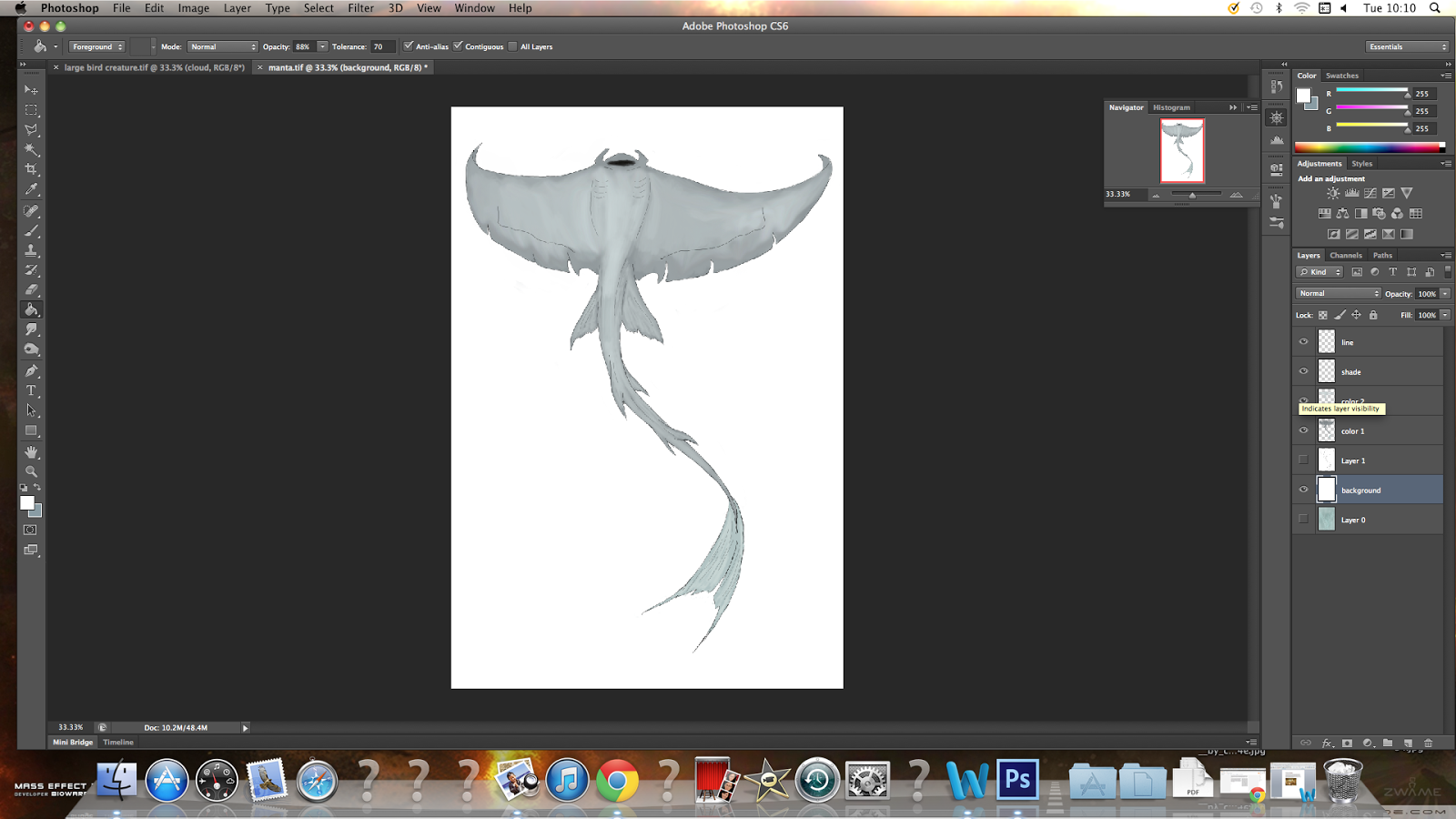


4. Adding another layer over the colour to add lighter colours. Again, I lowered the opacity and tolerance low enough to create some sort of lighter skin around the wings, tail and underbelly but also around the back so it would not have a simple plain grey colour, make so where the light would probably be seen. Now for shading, the mouth first as it would be slightly dark but not too much so the inside of it's jaw. Adding a few minor touches before I go on to the next and possibly final step of the design.


5.  On to the final stage is the background and wanting it to be a blueish and watery theme for the large swimmer. Giving it a greenish blue colour with the centre being darker then the outer edges as thought it was all misty and cloudy. Creating a trail of watery debris from the wings and tail as it moves it's body.


Another of the Shark Manta Ray in a different pose as the back is clearly seen, showing it's back with gill-like features along with two sets of eyes.

Friday, 24 January 2014

The Complete Book of Dragons

The Complete Book of Dragons is an illustrated book of which tells about the famous mythological creatures; Dragons. Explaining about the varied types of dragons across the planet, how they are born from hatchlings to fully grown adults. It's one of the well thought out books that talk about them and like the use of coloured media and sketches of the dragons. Given a more medieval artwork as some are commonly seen in a lot of detailed notes and information about. Tells about their behaviour based on other fairy tales and used in this book.

Wednesday, 15 January 2014

Creature Design: alien


One of the basic designs for the Booklet, I decided to create an a original and bizarre looking creature than the others I've designed for the project. It is going to be a alien-looking being with features of some insects, scary and frightening like in most movies. I have looked at a few samples of aliens from games, comics, movies and illustrations to get a clear idea how it should look before I get a clear idea of it.


1.  I've started it out as a simple sketch, rubbed off a few places to make the head good without any ruough edges and scanned it in the computer for the next step. Made it a triangular shaped head and make it a quarter view rather than the side so people could see one of it's left eyes and now narrow it's face is. MAde the carapace all curved and rounded near the edges and some lined features on the neck as though they were muscles or something.


2. Made a few layers to plan out the creature, this one is for drawing a line over it. Needed to zoom in to make sure the lines are not rugged or a mess, also to add some details, made sure the brush was down to a 1 or two so they would not look too thick.


3. For the carapace I chosen a darker colour theme, started out with a medium colour to start with on the carapace and darkened the purple for the shadow where the light wouldn't cast over it's head.


4. The next part of colouring is the neck, the eyes and the parts between the armored carapace. Adding another shadow under it's chin and make sure it matches the shape of it's lower jaw. Gave the eyes a dark greenish colour and like the carapace they would start with a dark colour first. Made a few dark areas on the skin to give it a soft texture.


5. On the next layer, wanting the carapace to have a texture and not looking so flat, making a lighter purple over it and leaving the edges untouched so it blend in well. The same thing I did for the eyes so they wouldn't look too dark. Decided to make the antennas not too long or thick. The areas between the curved armor plates around it's neck would have a dark shadow but blend well with it.


6. Now the head was done I decide to give the background somewhat of a earthly color but more to a grey/brown, make some of the background darker while the some of it is medium and the rest are lighter. It usually depends how much I click on.

Monday, 13 January 2014

CV Template

Having done some research on the CV template to make one I looked at some examples to make one myself. Making sure it is different from the others but with things needed to make it look good for an interview; grades, education and career history, also with references to show the person of that CV has about them and their skills so it would help apply for a job.

There are sources to find out more about the CV and help out to make one without any problems.

Websites:
http://www.businessballs.com/curriculum.htm
http://www.cv.co.uk/
http://jobs.theguardian.com/article/4170839/cv-templates/


Here on the right shows how the CV template should look like and has to be made proffessionally using Photoshop, Word Document or other file to make a CV that has text to write in it.

The CV template below is actually mine for an interview with the CCAD university and tells about me, my grades and any qualifications and certificates I achieved in the past, along with the grades during my time as a college student.

Thursday, 9 January 2014

Health and Safety

Health and safety in art is the importance for artists to keep their work clean and organized. The main priority for this is that the artists would not have trouble and always clean up after themselves; paints, brushes, paper, pen and also pencil.

  • For digital artists who do graphics art and digital illustration, they would have to keep their desk clear of food and drink if they spend most of the working hours on their computers.
  • Avoid spilling any drink and damage the computers, costing them the amount of data stored within the computers and all their work.
  • Keep a clean room so nothing can be left on the floor and stacked neatly on shelves, pencil cases, boxes and wardrobes so you would know where they are. People usually put pens, pencils and brushes in cups.
  • Always have a comfortable environment in the area you work with, a comfortable chair, lean back so you would not always have to sit up straight. 
  • It is most important to know what equipment and tools you need for your art, if some of them are sharp you would need to cover them with something so you would not accidentally cut yourself.
  • Some chemicals are not easy to wash off from clothes and could stain them, best use old clothing material you don't mind using. When not used, always be sure to seal them up tight with a lid.
  • Always make sure to check the temperature in the room you're working in, making sure it isn't too warm or cold, the seasons always change so be sure to keep a watch on the weather.

Websites about health and safety:

http://www.winsornewton.com/resource-centre/health--safety-data-information/
http://www.nsead.org/hsg/

Wednesday, 8 January 2014

Dragonart

 Dragonart is an illustrated art book published by Jessica Peffer, also by her given name "NeonDragon" who is a fantasy artist and drawn many creatures and characters. I bought this book as it had amazing tutorials that help give artists ideas how to draw creatures, finding ways to create new and stranger craetures by looking at other animals. I have used this mainly to draw creatures and ways to improve my skills of designing creatures.

Deviantart: neondragon.deviantart.com

Website:  http://neondragonart.com/

Encyclopedia of Dinosaurs & Prehistoric Life

This is one of the best source of information that explains a lot about extinct prehistoric creatures from millions of years of history; large Dinosaurs, prehistoric animals, plants and what the Earth was like in different like how the continents were millions of years ago, how they were once merged into one single super continent more than once.

I really loved collecting books about prehistoric life, been interested about what these animals were like when they were alive. They explain about the possible theories about their diet, the size and weight they had, how they moved and their behaviour back then after a few studies with their fossilized remains.